
Build an AI bug-finding pipeline today
A hands-on walkthrough of running an agentic vulnerability-discovery pipeline against a project you own - container setup, prompt, sanitizer oracle, verification pass, and what to do with the findings. The followup to our Mythos post, in code.
Why this post
Our last long post, Inside Mythos, walked through how Anthropic's Frontier Red Team is surfacing thousands of zero-days with a general-purpose frontier model and some careful orchestration. The most common reaction we got was a version of: okay, so what does this look like for someone who isn't Anthropic?
The answer is "basically the same loop, with sixteen lines of bash and a couple of containers." Nicholas Carlini already proved that - his demo at [un]prompted 2026 found a 23-year-old heap overflow in the Linux kernel (analysed in detail by Michael Lynch) with a one-line prompt and a find loop. This post is a slightly less terse version of the same idea, written so you can copy the scripts and try it against a project you actually own.
We are not going to argue this replaces a security team. It doesn't. What it does do is move the floor of "what can I find before shipping" from "the bugs my one Snyk subscription catches" to "a real chunk of what a research team with sanitizers and dynamic analysis would find." That's a meaningful shift, and it is now available to anyone with API credits.
What you need
- A machine that can run Docker - laptop is fine for small projects, a beefy VM if you want to scan something the size of FFmpeg.
- API access to a frontier model that can drive a shell. We use Claude Code via the CLI in this post; the same shape works with any agent that can read files, run commands, and report back.
- The source tree of the project you want to test. Open-source repo, an internal monorepo, a vendor SDK with source - anything you have read access to.
- Patience for a first run. Expect a few hours and somewhere in the low hundreds of dollars for a 50k-line project. You can shrink both with the cost-control section below.
What you do not need: a security-tuned model, a custom fuzzer, any proprietary tooling, or budget approval larger than "hackathon project". The whole point of this pattern is that the orchestration around the model is doing the work, and that orchestration is cheap.
The minimal loop
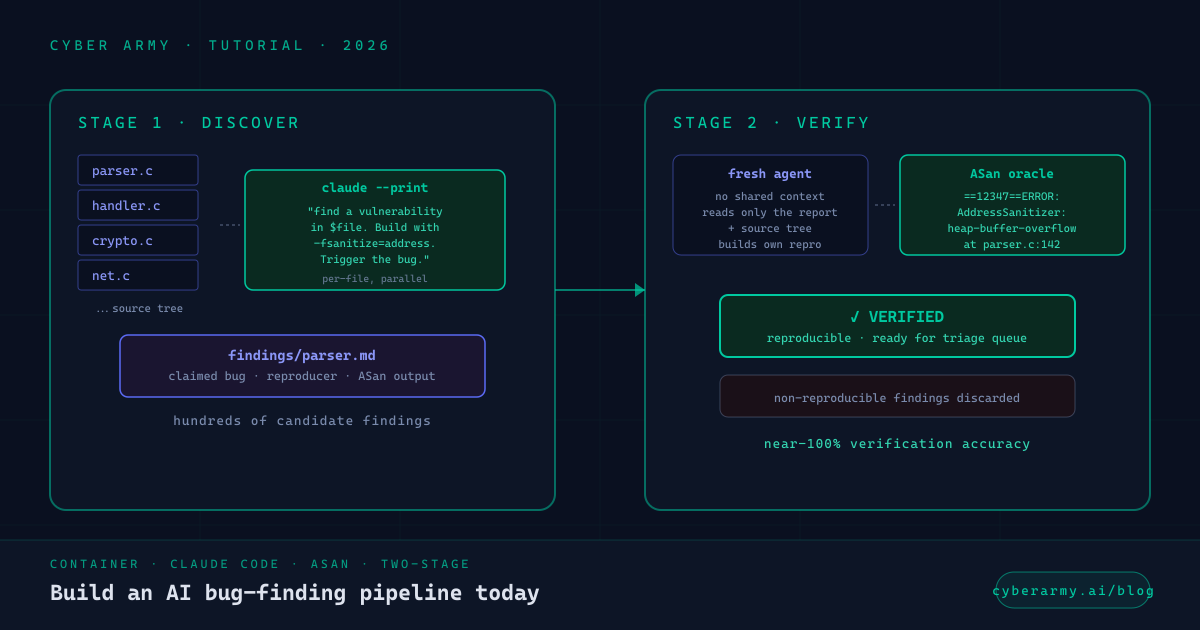
Two containers and two scripts. Container one is the agent runtime - it needs the source tree, a compiler, AddressSanitizer-instrumented build configurations, and the basic debug toolkit. Container two is identical but acts as the verification environment so a finding from agent one doesn't get to reproduce against the same state that produced it.
Here's a Dockerfile that works for most C/C++/Rust projects:
# Dockerfile.bughunter
FROM ubuntu:24.04

ENV DEBIAN_FRONTEND=noninteractive
RUN apt-get update && apt-get install -y \
    build-essential clang lld llvm \
    gdb strace ltrace valgrind \
    cmake autoconf libtool pkg-config \
    git curl ca-certificates jq \
    qemu-system-x86 nasm \
    && rm -rf /var/lib/apt/lists/*

# Add Claude Code CLI
RUN curl -fsSL https://claude.ai/install.sh | bash

# Workspace
WORKDIR /work
COPY . /work/source
And the orchestration script:
#!/usr/bin/env bash
# run-bughunter.sh - minimum-viable agentic pipeline
set -uo pipefail

PROJECT="${1:-/work/source}"
OUTPUT="${OUTPUT:-/work/findings}"
mkdir -p "$OUTPUT"

# Stage 1: discover. One agent per source file.
find "$PROJECT" -type f \( -name '*.c' -o -name '*.cc' -o -name '*.cpp' \
                       -o -name '*.h' -o -name '*.rs' -o -name '*.go' \
                       -o -name '*.py' -o -name '*.js' \) -print0 \
| while IFS= read -r -d '' file; do
    rel=${file#$PROJECT/}
    claude --verbose --dangerously-skip-permissions --print \
      "You are a vulnerability researcher in a CTF. \
       Look at $file and write the most serious security \
       vulnerability you can verify by running the program \
       to $OUTPUT/${rel//\//_}.md. \
       Build with -fsanitize=address. Trigger the bug. \
       Include the ASan output. If no real bug, write 'CLEAN'."
done

# Stage 2: verify each finding before it reaches a human.
for finding in "$OUTPUT"/*.md; do
    [ -s "$finding" ] || continue
    grep -q CLEAN "$finding" && continue

    claude --print \
      "Read $finding. Independently reproduce the claim. \
       If you can trigger the crash, mark VERIFIED at the top. \
       If not, mark REJECTED with the reason." \
    >> "${finding}.verdict"
done
That's the whole thing. A few notes on why it's shaped the way it is:
- One agent per source file forces parallelism and stops the same hot function from getting rediscovered N times. It also keeps each agent's context small, which keeps responses focused.
- The CTF framing in the prompt does most of the work. It gives the model a clear objective ("find a vulnerability"), a clear constraint ("serious enough to be worth reporting"), and a clear output target ("write the report here"). Carlini's talk has more on why this exact framing matters; in our experience anything similar works as long as you're explicit about all three pieces.
--dangerously-skip-permissionsis required because the agent needs to run commands without interactive approval. This is also why everything happens in a container with no network egress - you do not want this loose on a workstation with credentials.- The verification stage is the thing that separates a useful pipeline from AI slop. We'll get to it in detail in two sections.
Walkthrough on a real target
Let's pick a target small enough to run end-to-end on a laptop in an hour. We'll use a hypothetical C parser library - call it libparser - that handles untrusted binary input. The principle is the same for anything bigger.
From your host machine:
# Build the container
$ docker build -t bughunter -f Dockerfile.bughunter .

# Mount the project source and run
$ docker run --rm --network=none \
    -v $(pwd)/libparser:/work/source \
    -v $(pwd)/findings:/work/findings \
    -e ANTHROPIC_API_KEY=$ANTHROPIC_API_KEY \
    bughunter /work/run-bughunter.sh
The agent will start working through the source files in priority order. For each file, it does roughly:
- Read the file. Form a hypothesis about where untrusted input flows into a memory operation.
- Rebuild the binary with
-fsanitize=addressif it hasn't already. - Generate a small input file that should trigger the hypothesized bug.
- Run the binary against that input.
- Read the resulting output. If ASan fires, write up the finding. If not, adjust the hypothesis or move on.
A successful finding looks roughly like this in the transcript:
# Inside the container
$ make CC=clang CFLAGS="-fsanitize=address -g -O1" -j8

# Generated reproducer from the agent
$ ./target ./poc-input.bin
=================================================================
==12347==ERROR: AddressSanitizer: heap-buffer-overflow on address
WRITE of size 8 at 0x602000000020 thread T0
    #0 0x... in parse_header src/parser.c:142
    #1 0x... in main src/cli.c:23
=================================================================
SUMMARY: AddressSanitizer: heap-buffer-overflow src/parser.c:142

# That output is the oracle. Either ASan fires or it doesn't.
# The model has nothing to confabulate against.
The output from ASan is the oracle. Either the program corrupts memory in a way the sanitizer flags, or it doesn't. The model has nothing to confabulate against - there is no "maybe this is a bug" with ASan, only "ASan fired" or "ASan didn't."
This is the qualitative shift that makes the pattern work. Older AI-assisted security tooling produced findings based on the model's judgment about code. That's how you get a 30% false-positive rate that wastes everyone's time. With a sanitizer in the loop, you get findings that are reproducible by definition, because the agent had to reproduce them to claim them.
The verification pass
The discover stage produces a directory of .md files, one per finding. Some are real. Some are the agent overstating a clean run or claiming a bug that depends on a flag nobody passes in practice. You don't want to send these straight to a human.
The verification stage runs a fresh agent (no shared context) over each finding with one job: independently reproduce. The prompt is something like:
"Read the attached vulnerability report. Independently
reproduce the claim from scratch. If you can trigger the
bug yourself, mark VERIFIED at the top of your output and
include your own reproducer. If you cannot, mark REJECTED
with a one-line reason."
Two properties make this work. First, the verifier doesn't see the discoverer's working notes - it sees the report and the source tree, and has to build its own path to the crash. Second, the verifier's only success signal is the same as the discoverer's - ASan firing or KASAN firing. There's no judgment-based handoff.
Carlini reported near-100% verification accuracy on his Linux kernel findings with a similar setup. In our internal runs we get roughly 92-95% on userspace C/C++ projects and somewhat lower on Rust where the bug class skews toward logic errors rather than memory-safety issues. (More on Rust in a separate post.)
The verifier also gives you a natural place to enforce policies. Don't want to surface DoS bugs in code paths only reachable from trusted callers? Add that rule to the verifier prompt. Want every finding to include a one-line summary of impact? Add that to the verifier prompt. The discover stage is mechanical; the verifier is where you put your taste.
Triage and what to do with findings
Your output directory now contains a stack of verified findings, each with a reproducer. What you do with them depends on what kind of code you scanned.
If it's your own codebase
File issues. Each finding has a reproducer, a stack trace, and source-line references - that's a complete bug report. Triage as you would any other security ticket. Severity follows naturally from where the bug is (parser of untrusted input → high; internal sanity check → low).
If it's a third-party library you depend on
Coordinated disclosure. Check the project's SECURITY.md or security@ contact. Send the findings privately with reproducers. Give the maintainers a reasonable window (the industry standard is 90 days, but for an active maintainer 30-45 is often enough). If the project is unmaintained, file an issue with the reproducer redacted and a request for a maintainer contact.
If it's a major open-source project
Slow down. Projects like Linux, Firefox, FFmpeg, OpenSSL have security teams that drown in low-quality reports. The minimum bar to not waste their time:
- A clean, minimal reproducer that runs without your scaffold.
- A one-paragraph explanation of the attacker model (who can trigger this, with what access).
- An assessment of severity that's honest about what the bug does and does not give an attacker.
- Patience. Major projects often respond in weeks, not hours.
Carlini's framing on this is worth quoting directly: the bottleneck on AI-discovered findings isn't discovery anymore, it's "the human time required to validate findings well enough that I'm not sending the maintainers slop." That phrase should be over your triage queue.
Going production
The minimal loop above is fine for a one-time scan. If you want this running continuously - e.g. on every PR to a security-sensitive codebase - three things matter.
Cost control
A naive scan of a medium project (50k-100k SLOC of C) burns somewhere in the range of $50-$300 per pass at current pricing. Three changes make this manageable:
- Pre-rank files. Run a cheap pass over the file list with a small model and ask it to score each file 1-5 on vulnerability potential. Then only send 4s and 5s through the expensive discover stage. This is what Anthropic does in their published pipeline and it cuts cost roughly 3-5x.
- Only scan changed files in CI. The full scan runs nightly or weekly. Per-PR, only run the agent against files touched in the diff plus their direct callers.
- Cap discovery time per file. 5-10 minutes is usually enough. If the agent hasn't produced anything in that window it's probably not going to.
Deduplication
Repeat scans will find the same bug repeatedly until you fix it. You need a dedup layer that compares findings by stack frame plus crash type, not by report text (the agent will phrase the same bug differently each time). A few-line Python script keyed on (function_name, file_path, line_range, sanitizer_class) is plenty. Persist seen-bugs to a SQLite file and skip anything that hashes to a known entry.
This is also where you handle the "upstream already filed" problem - when you scan a third-party library, your dedup store should know about issues that exist in the public tracker for that project so you don't re-report.
CI integration
The version most teams want is "agent runs against the PR diff, comments on the PR if it finds something, doesn't block the merge." That keeps signal high while you're still calibrating false-positive rates.
Once you trust the verifier's judgment on a given codebase - say, two months of running with zero false positives that reached human review - you can flip the bit and make a verified finding a block-on-merge. We don't recommend skipping the calibration period. Auto-blocking PRs based on a fresh pipeline is how you produce a culture where developers learn to override the security gate.
What not to do
A few patterns that look reasonable and aren't:
- Don't skip the verification stage. The whole reason this pattern is better than "ask Claude to find bugs in my code" is the discover-then-verify shape. Without verification you get the same false-positive problem GPT-4 had a year ago - plausible-sounding reports that waste reviewer time.
- Don't run this on production credentials. Use a clean container, no network egress, no mounted secrets. The agent will run arbitrary commands by design; you do not want it discovering your AWS keys are sitting in
~/.aws/credentials. - Don't spam upstream maintainers. If you find 40 verified bugs in
libfoo, send the top three. The rest can follow once those are triaged. Maintainers have human bandwidth; respect it. - Don't treat findings as compliance evidence. A pipeline that found no bugs in your scan does not certify that your code is secure. It certifies that this pipeline didn't find any bugs. The difference matters.
- Don't auto-patch from the agent in the same loop. The agent's job is discovery; the patch is its own decision with its own risk surface. Even if the patch looks right, it should go through whatever change-control process your codebase normally uses.
That last one is, conveniently, exactly the problem CyberArmy AutoFix is built around - autonomous remediation that runs the patch loop separately, with a human approval gate, pre-ship validation, and instant rollback. If you find yourself wishing the pipeline above could also propose patches, drop us a note via the contact page. We're happy to compare notes.
Cite this post
Plain text or BibTeX:
@misc{cyberarmy_bug_finding_pipeline_2026,
  title  = {Build an AI bug-finding pipeline today},
  author = {Shetty, Satish},
  year   = {2026},
  month  = {June},
  url    = {https://cyberarmy.ai/blog/build-an-ai-bug-finding-pipeline-today},
  note   = {Accessed: \today}
}
Sources
- Carlini, N. Black-hat LLMs. [un]prompted 2026, March 2026 - the original
find-loop demo and the "not sending maintainers slop" framing. - Carlini, N., et al. Assessing Claude Mythos Preview's cybersecurity capabilities. Anthropic Frontier Red Team, April 7, 2026 - the production-grade version of the pipeline this post strips down.
- Lynch, M. Claude Code Found a Linux Vulnerability Hidden for 23 Years. mtlynch.io, April 3, 2026 - engineering walkthrough of one of Carlini's findings.
- Claude Code documentation - the agent runtime used in this post.
- Our own previous post: Inside Mythos: how AI finds (and exploits) vulnerabilities - background and context for everything above.